NEW FINDS EVERY WEEK!


Trending Now
Popular Products
Turn heads and get laughs at your next event with a realistic 3D face mask. This full face headgear prints a high-definition human face onto soft, breathable nylon. It is perfect for pranks, Halloween parties, and cosplay. The mask covers your entire head for...
- $10.99
- $10.99
- Unit price
- per
-
NoB21
-
NoA14
-
NoA30
-
NoA18
Stop losing your phone, keys, and coins between the car seat and center console. This car seat gap filler and organizer plugs the crevice to keep your essentials safe and within reach. This universal seat gap filler is designed to solve a common driving...
- $10.99
- $10.99
- Unit price
- per
-
2PCS Beige
-
2PCS Black
-
2PCS Brown
-
2PCS Red
Upgrade your car's audio reception and exterior look with this sleek Shark Fin Antenna. It boosts FM and AM signals for clearer radio while adding a modern, aerodynamic style to any vehicle. This replacement antenna is designed to improve your listening experience. It strengthens...
- $10.99
- $10.99
- Unit price
- per
-
Blue
-
Dark Gray
-
Silver
-
White
Add comfort, control, and hands-free functionality to your phone with the Popped Finger Ring Holder. This sleek and expandable accessory gives you a secure grip when texting, scrolling, or taking photos. It also works as a convenient stand for watching videos, video calls, or...
- $10.99
- $10.99
- Unit price
- per
-
qqzjbeta027
-
qqzjbeta020
-
qqzjbeta019
-
qqzjbeta018
Step into the world of classic gaming with this Shy Guy mask. Designed for cosplay, Halloween, and themed parties, this mask brings an iconic character to life with a smooth finish and bright colors. It is lightweight, comfortable, and easy to wear for long...
- $10.99
- $10.99
- Unit price
- per
-
girl
-
boy
Trending Now
Popular Products

- $10.99
- $10.99
- Unit price
- per
-
NoB21
-
NoA14
-
NoA30
-
NoA18

- $10.99
- $10.99
- Unit price
- per
-
2PCS Beige
-
2PCS Black
-
2PCS Brown
-
2PCS Red

- $10.99
- $10.99
- Unit price
- per
-
Blue
-
Dark Gray
-
Silver
-
White

- $10.99
- $10.99
- Unit price
- per
-
qqzjbeta027
-
qqzjbeta020
-
qqzjbeta019
-
qqzjbeta018

- $10.99
- $10.99
- Unit price
- per
-
girl
-
boy
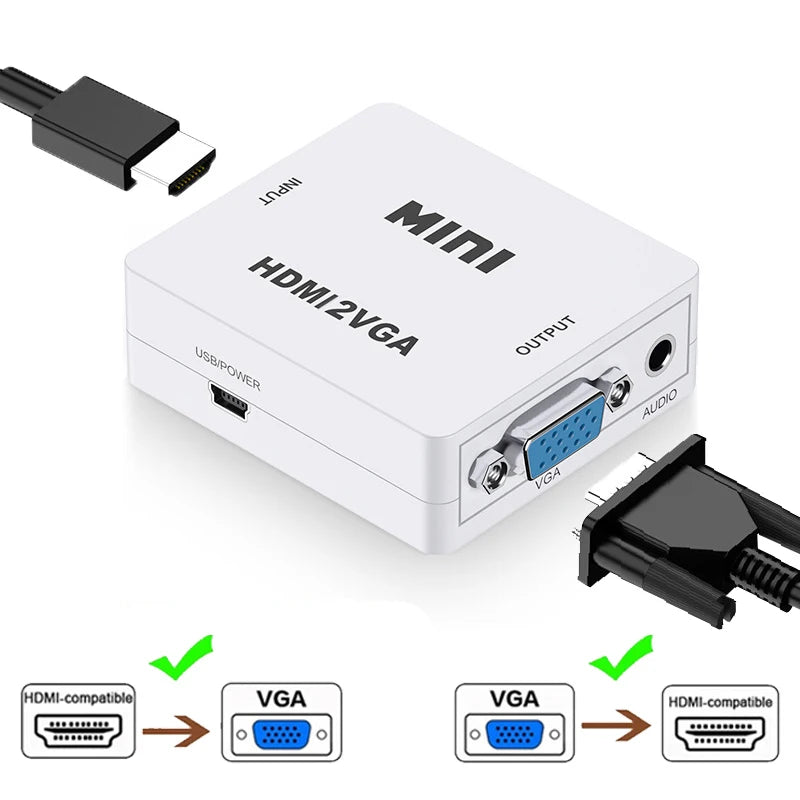


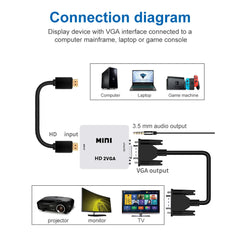


HDMI to VGA Converter with Audio | 1080P Adapter for Notebook Xbox PS3 PC Projector
- $10.99
- $10.99
- Unit price
- per
Free Shipping
Free standard shipping on orders over $35


Description
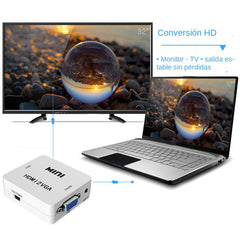
xConnect your modern HDMI devices to older VGA displays and projectors without losing audio. This compact HDMI to VGA converter supports 1080P resolution and includes a 3.5mm audio output for speakers or headphones. It works in both directions, converting HDMI to VGA or VGA to HDMI, making it a versatile tool for presentations, home entertainment, and gaming setups.
This adapter is built for plug-and-play convenience. No driver installation or software setup is needed. Just connect the cable, and the signal is automatically converted. The full hardware conversion process delivers clear video with good brightness and contrast, suitable for watching movies, showing slides, or playing games on larger screens.
The converter draws power from the HDMI source or a USB port when extra power is needed. It supports HDMI 1.3 and is backward compatible with earlier versions. The device automatically detects HDCP, so it works with protected content from Blu-ray players and streaming devices.
Whether you are connecting a laptop to a conference room projector or hooking up a game console to an older monitor, this adapter handles the job reliably. The compact size makes it easy to carry in a laptop bag or desk drawer.
Key Features and Benefits
- Plug-and-play design that requires no driver installation for quick and easy setup
- Full hardware conversion processing that maintains high image definition and contrast for clear visuals
- Supports HDMI 1.3 and automatically detects HDCP for compatibility with protected content
- Includes a 3.5mm audio output for connecting speakers or headphones to enjoy sound
- USB power supply option ensures stable operation when the HDMI source provides insufficient power
- Compact and portable size for easy transport between home, office, and travel locations
Who Is This For
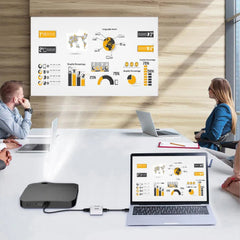
- Professionals who need to connect a modern laptop to an older VGA projector for presentations
- Gamers using Xbox 360, PS3, or PC to play on a VGA monitor or TV
- Home theater enthusiasts connecting Blu-ray players or set-top boxes to VGA displays
- Students or educators using projectors in classrooms that only support VGA input
Usage Scenario
Mark was preparing a client presentation in a conference room. His laptop only had an HDMI output, but the room projector used an older VGA connection. He plugged the HDMI to VGA converter into his laptop, connected the projector cable, and inserted a small USB power cord into his laptop for extra power. The image appeared on the screen instantly with no configuration needed. He also connected a small speaker to the 3.5mm audio port so everyone could hear the video clips in his slides. The presentation went smoothly without any technical interruptions.
Micro Comparison
Unlike simple passive HDMI to VGA cables that may not work with all devices, this active converter includes built-in signal processing and a USB power option for reliable performance. Many adapters only convert in one direction, but this unit supports both HDMI to VGA and VGA to HDMI conversion, giving you more flexibility for different setups.
Specifications
- Input port: 1 HDMI-compatible
- Output interface: 1 VGA, 1 Analog Audio (3.5mm headphone jack)
- Power input: DC 5V
- HDMI input: 480p, 720p, 1080i, 1080p at 60Hz
- VGA output resolution: 640x480 to 1920x1080 at various refresh rates
- HDMI version: 1.3 (compatible with 1.0, 1.1, 1.2)
- Bandwidth: up to 1920x1280 at 60Hz
Package Includes
- 1 x HDMI to VGA converter
- 1 x USB power cable
- 1 x Instruction manual
Why You Will Love It
This adapter solves the common problem of connecting new devices to older displays without complicated setup. You get both video and audio in one compact device, so you do not need extra cables or adapters. It is a practical solution that saves time and frustration during important presentations or entertainment sessions.
Questions and Answers
Question: Does this adapter work with a laptop that only has HDMI output?
Answer: Yes, it converts HDMI signal to VGA, so you can connect your laptop to a VGA monitor or projector.
Question: Can I use this to connect an old computer with VGA output to a modern HDMI TV?
Answer: Yes, this adapter works in both directions. It can convert VGA to HDMI as well.
Question: How do I get audio when using the HDMI to VGA conversion?
Answer: The adapter has a 3.5mm audio output. Connect speakers or headphones to that port to hear sound.
Question: Do I need to install any software or drivers to use this converter?
Answer: No, it is plug-and-play. Just connect the cables and it works automatically.
Question: Will this work with my Xbox 360?
Answer: Yes, it works with Xbox 360, PS3, DVD players, PCs, and other HDMI devices.
Question: What if the image does not appear on the screen?
Answer: Try connecting the USB power cable to a USB port on your device or a USB charger, as some sources do not provide enough power through the HDMI connection.
Compare color
Related Products
- $10.99
- $10.99
- Unit price
- per
- $10.99
- $10.99
- Unit price
- per
- $10.99
- $10.99
- Unit price
- per
- $10.99
- $10.99
- Unit price
- per
- $10.99
- $10.99
- Unit price
- per
- $10.99
- $10.99
- Unit price
- per
- $10.99
- $10.99
- Unit price
- per
- $10.99
- $10.99
- Unit price
- per
- $10.99
- $10.99
- Unit price
- per
- $10.99
- $10.99
- Unit price
- per
- Choosing a selection results in a full page refresh.