NEW FINDS EVERY WEEK!


Trending Now
Popular Products
Turn heads and get laughs at your next event with a realistic 3D face mask. This full face headgear prints a high-definition human face onto soft, breathable nylon. It is perfect for pranks, Halloween parties, and cosplay. The mask covers your entire head for...
- $10.99
- $10.99
- Unit price
- per
-
NoB21
-
NoA14
-
NoA30
-
NoA18
Stop losing your phone, keys, and coins between the car seat and center console. This car seat gap filler and organizer plugs the crevice to keep your essentials safe and within reach. This universal seat gap filler is designed to solve a common driving...
- $10.99
- $10.99
- Unit price
- per
-
2PCS Beige
-
2PCS Black
-
2PCS Brown
-
2PCS Red
Upgrade your car's audio reception and exterior look with this sleek Shark Fin Antenna. It boosts FM and AM signals for clearer radio while adding a modern, aerodynamic style to any vehicle. This replacement antenna is designed to improve your listening experience. It strengthens...
- $10.99
- $10.99
- Unit price
- per
-
Blue
-
Dark Gray
-
Silver
-
White
Add comfort, control, and hands-free functionality to your phone with the Popped Finger Ring Holder. This sleek and expandable accessory gives you a secure grip when texting, scrolling, or taking photos. It also works as a convenient stand for watching videos, video calls, or...
- $10.99
- $10.99
- Unit price
- per
-
qqzjbeta027
-
qqzjbeta020
-
qqzjbeta019
-
qqzjbeta018
Step into the world of classic gaming with this Shy Guy mask. Designed for cosplay, Halloween, and themed parties, this mask brings an iconic character to life with a smooth finish and bright colors. It is lightweight, comfortable, and easy to wear for long...
- $10.99
- $10.99
- Unit price
- per
-
girl
-
boy
Trending Now
Popular Products

- $10.99
- $10.99
- Unit price
- per
-
NoB21
-
NoA14
-
NoA30
-
NoA18

- $10.99
- $10.99
- Unit price
- per
-
2PCS Beige
-
2PCS Black
-
2PCS Brown
-
2PCS Red

- $10.99
- $10.99
- Unit price
- per
-
Blue
-
Dark Gray
-
Silver
-
White

- $10.99
- $10.99
- Unit price
- per
-
qqzjbeta027
-
qqzjbeta020
-
qqzjbeta019
-
qqzjbeta018

- $10.99
- $10.99
- Unit price
- per
-
girl
-
boy
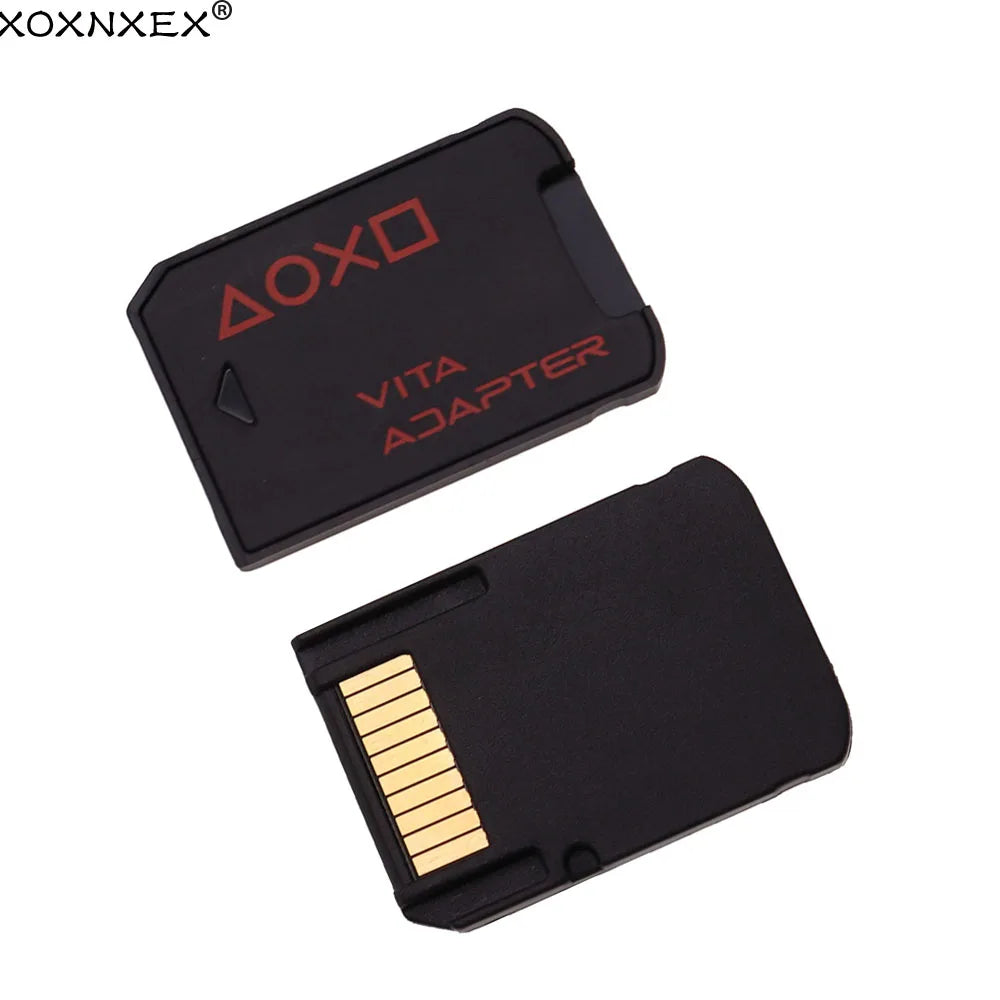


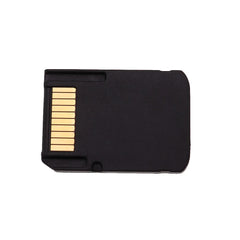


SD2Vita Version 3.0 | PS Vita Memory Card Adapter for PSV 1000/2000
- $10.99
- $10.99
- Unit price
- per
Free Shipping
Free standard shipping on orders over $35


Description
xThe SD2Vita Version 3.0 adapter lets you replace your expensive PS Vita memory card with a standard Micro SD card. It supports up to 256GB of storage and works with both PS Vita 1000 and 2000 models on system firmware 3.60.
This small adapter fits directly into the game card slot of your PS Vita. It allows you to use a Micro SD card for all your game saves, digital downloads, and homebrew applications. The loading speed is faster than original Sony memory cards, giving you a smoother gaming experience.
Made from high precision molding materials, this adapter is built to last. It is lightweight and does not add any extra bulk to your handheld console. Simply insert your formatted Micro SD card into the adapter, place it into the game card slot, and you are ready to go.
Whether you need more space for your game library or want to run custom firmware, the SD2Vita Version 3.0 is a simple and cost effective solution. It eliminates the need for expensive proprietary memory cards and gives you full control over your storage.
Key Features and Benefits
- Version 3.0 design that supports Micro SD cards up to 256GB for massive game storage
- Faster loading speeds compared to original Sony memory cards for reduced wait times
- Compatible with both PS Vita 1000 and 2000 models for broad use
- High precision molding and durable materials for long lasting reliability
- Small form factor that fits flush into the game card slot without sticking out
- Works with system firmware 3.60 for easy setup with homebrew and custom firmware
Who Is This For
- PS Vita owners who want to expand storage without buying expensive Sony memory cards
- Homebrew enthusiasts running custom firmware on firmware 3.60
- Gamers who need more space for digital game downloads and saves
- Collectors and modders looking for a reliable and affordable storage upgrade
Usage Scenario
Alex had a 32GB Sony memory card in his PS Vita 2000, but it was constantly full. He could not download new games without deleting old ones. After switching to the SD2Vita Version 3.0 with a 256GB Micro SD card, he installed his entire digital library and still had room for more. Load times improved, and he no longer worried about storage limits during long trips.
Micro Comparison
Original Sony memory cards are expensive and limited to 64GB maximum capacity. The SD2Vita Version 3.0 supports up to 256GB at a fraction of the cost. It also offers faster read and write speeds, making game loading and app performance noticeably better. If you already own a Micro SD card, this adapter is the most affordable way to upgrade your PS Vita storage.
Specifications
- Version: 3.0
- Compatibility: PS Vita 1000 / 2000
- Supported Firmware: 3.60
- Maximum Storage: 256GB Micro SD card
- Material: High precision molded plastic
- Color: Black
Size Guide
Please allow 1-3 cm / 0.4-1.2 in difference due to manual measurement.
- Adapter dimensions: 3.2 cm x 2.0 cm x 0.3 cm / 1.26 in x 0.79 in x 0.12 in
Package Includes
- 1 x SD2Vita Version 3.0 Adapter
Why You Will Love It
You will love how easy it is to expand your PS Vita storage without spending a lot of money. The faster load times make your games feel more responsive. Plus, using a standard Micro SD card means you can swap storage instantly and carry multiple cards for different game collections.
Questions and Answers
Question: Does this work with any PS Vita model?
Answer: Yes, it works with both PS Vita 1000 and PS Vita 2000 models.
Question: What firmware do I need for this adapter?
Answer: It is designed for system firmware 3.60 with custom firmware support.
Question: Can I use any Micro SD card with this adapter?
Answer: Yes, as long as you format the Micro SD card correctly for use with your custom firmware.
Question: Does this adapter stick out of the game card slot?
Answer: No, it fits flush inside the slot and does not add extra bulk to the console.
Question: How do I set up the SD2Vita adapter?
Answer: Insert your formatted Micro SD card into the adapter, place it into the game card slot, and configure storage settings through your custom firmware.
Related Products
- $10.99
- $10.99
- Unit price
- per
- $10.99
- $10.99
- Unit price
- per
- $10.99
- $10.99
- Unit price
- per
- $10.99
- $10.99
- Unit price
- per
- $10.99
- $10.99
- Unit price
- per
- $10.99
- $10.99
- Unit price
- per
- $10.99
- $10.99
- Unit price
- per
- $10.99
- $10.99
- Unit price
- per
- $10.99
- $10.99
- Unit price
- per
- $10.99
- $10.99
- Unit price
- per
- Choosing a selection results in a full page refresh.